
Symptoms
When you want to edit, update or change Pool of a legacy user you can receive these possible errors:
1. Moving a legacy user to a new Lync 2010 pool using Lync Server 2010 using Lync Control panel window:
Click on User, Action, Move selected users to pool, from Move Users window, choose your new Pool from Destination Registrar Pool, check Force and click Ok.
Error: Cannot modify a legacy user using cmdlet.
2. Move a legacy user using PowerShell:
Move-CsLegacyUser -Identity "<user>" -Target "<FQDNPool>"
Error:
Move-CsLegacyUser : Object reference not set to an instance of an object.
At line:1 char:18
+ Move-CsLegacyUser <<<< -Identity "<user>" -Target "<FQDNPool>"
+ CategoryInfo: NotSpecified: (:) [Move-CsLegacyUser], NullReferenceException
+ FullyQualifiedErrorId: System.NullReferenceException,Microsoft.Rtc.Management.AD.Cmdlets.MoveOcsLegacyUserCmdlet
3. Enable a legacy user using PowerShell:
Enable-CsUser -Identity "<user>" -RegistrarPool "<FQDNPool>" -SipAddress "sip: <sipaddress>"
Error:
Enable-CsUser : Cannot move legacy user in enable operation. Use the Move user cmdlet instead.
At line:1 char:14
+ Enable-CsUser <<<< -Identity "<user>" -RegistrarPool "<FQDNPool>" -SipAddress "sip: <sipaddress>"
+ CategoryInfo: InvalidOperation: (:) [Enable-CsUser], InvalidOperationException
+ FullyQualifiedErrorId : ProcessRecord,Microsoft.Rtc.Management.AD.Cmdlets.EnableOcsUserCmdlet
Cause
A common cause is about Lync test environments, that required to start from scratch for one reason or another. The problem resides in active directory which is still detecting their old topology and causing issues with moving forward with the new environment. This post will cover what is required to remove references to the Lync or OCS deployment from Active Directory.
One very important thing to note here, once you extend your AD Schema, unless you revert from a backup, you will not be able to back out those changes.
In Office Communications Server 2007 R2, majority of configuration data was stored in Active Directory, however Lync Server 2010 stores most of the configuration data in the Central Management Store, which is a SQL database that lives on your servers in the topology. Full details in this article: Lync Server 2010 Active Directory References, and how to Remove Them.
Resolution
To solve this situation you need to manually clean up Active Directory OCS properties of legacy users.
1. Identify Legacy users: from Lync Server 2010 Control Panel, go to Users, Add Filter, choose Legacy user equal to True and then press Find.
2. Note SIP address for a desired user to migrate into the new deployment or Display Name of user.
3. On domain controller or another server from your domain, open ADSI Edit to edit Active Directory schema. Start, Run, Adsiedit.msc.
4. From ADSI Edit, Action menu, choose option Connect To
5. From Connection Settings window select Default naming context and press Ok.
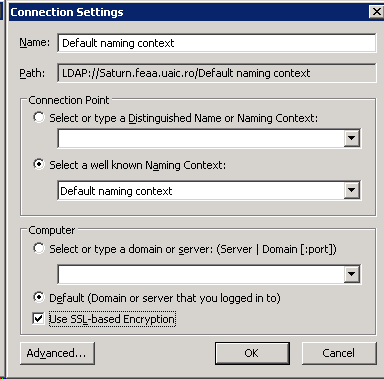
6. You must find the user in this context, navigating into your LDAP structure. You must know in which OU is user located. You do not have any find options here.
7. Identify the canonical name of user: CN=<Display Name>, click on name, Action, Properties.
8. You can filter only attributes that have values: Filter, Show only attributes that have values
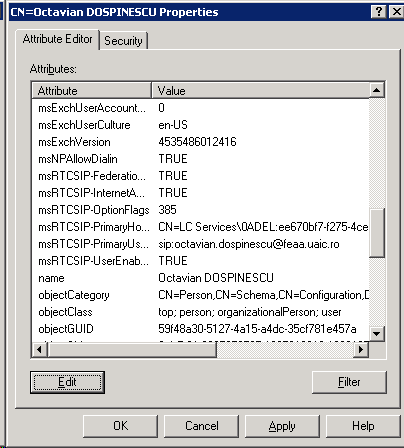
9. Identify the msRTC* attributes. Click on it and then click Edit.
10. In Attribute Editor window, click Not set (for bolean attributes) and then Ok. If the attribute is integer or string click Clear and Ok.
11. Close Properties window and then verify in Lync Server 2010 Control Panel if the user is still legacy.
12. Enable user from Lync Server Management shell:
Enable-CsUser –Identity domain\account.name –RegistrarPool <yourFQDNPool> -SipAddress sip:account.name@yourFQDNDomain
More Information
You can found another possible solution here:
Lync 2010 Server Move-CsLegacyUser fails when legacy user policies have been deleted before the user migration: http://support.microsoft.com/kb/2441886


 Valy Greavu - Live Blog