Republicare din revista PIN Magazine, Nr. 7, Decembrie 2017, http://www.pinmagazine.ro/2017/12/17/elemente-de-gdpr-in-office-365-pune-ti-datele-la-adapost-de-scurgeri-sau-furt/
Avertisment: Nu sunt expert GDPR și acesta nu este un articol tehnic.
Apărut în urmă cu ceva timp și cu aplicabilitate concretă din 25 mai 2018, GDPR este unul din cele mai prezente buzzword-uri ale acestor zile. Dincolo de beneficiile pe care le-ar putea aduce, GDPR reprezintă o nouă oportunitate de afaceri, care readuce în prim plan „implementatorii” de standarde integrate de management: ISO9001, ISO27001 și alte ISO care au legătură cu managementul informației și proceselor. Doar că regulamentul european nu mai este o opțiune, un must have ci o regulă concretă de gestionare a sistemelor informaționale din cadrul tuturor tipurilor de companii care au legătură cu informații personale. Piața fiind atât de mare, dar și cerințele foarte complexe, pe piața implementatorilor „joacă” acum casele mari de avocatură, marile firme de consultanță IT și management și mulți alții.
Concret, nimeni nu are nevoie de o certificare GDPR sau, mai direct, de un carton atârnat pe perete. Poate foarte multe companii au deja implementate mare parte din normele respective și trebuie doar să le formalizeze puțin. Poate cu ajutorul unui avocat, consultant sau doar o sumă de minți luminate din companie. Un principiu de bază în securitatea sistemelor informaționale este limitarea suprafeței de atac. Asta se traduce în GDPR cu inventarul informațiilor pe care le colectezi în sistemul tău informațional, reducerea acestora dacă este cazul, păstrarea acestora în locuri securizate și neutilizarea în campanii de marketing sau „contacts exchange”. Inventarul informațiilor și proceselor este primul pas.
Procesele în cadrul companiilor (și nu mă refer deloc doar la cele de stat) au de multe ori trasee birocratice inimaginabile. Cel puțin pe „hârtie”. Pentru că „practica” mai adaugă sau mai scurtcircuitează pași și te „trezești” cu o altă copie de buletin într-un fișet. Sunt documentate aceste procese undeva? Normal că da. Ele sunt în tot felul de regulamente interne pe care nu le citește nimeni, în documentele ISO pe care nu le-a citit nimeni, dar cel mai frecvent, ele sunt cu adevărat doar în mintea oamenilor de pe „traseu”. Normal că aceste cuvinte nu reflectă o realitate absolută. Harta fiecărui proces, cea reală corectă și care să poată încăpea într-un „A4”, este al doilea pas pe care l-aș urma eu.
Fiecare proces colectează, prelucrează și generează date și informații rezidente electronic pe documente structurare sau nestructurate. Cele structurate sunt în responsabilitatea aplicațiilor și dezvoltatorilor de aplicații. Cele nestructurate intră în seama aplicațiilor de document management. O utilizare neconformă a informațiilor, practicată alarmant de frecvent de utilizatori, este aceea de a exporta informațiile din aplicații și a le manipula în documente nestandardizate, nestructurate, fără politici de clasificare sau acces asociate. Normal că avem nevoie de Excel-uri pentru a face rapoarte, sau pentru a extrage doar câteva rânduri dintr-o bază de date pentru a face un proces verbal în Word, sau doar anumite informații cu care să putem face o prezentare PowerPoint pentru stakeholders. Și toate acestea le trimitem ca atașament pe mail-ul personal ca să lucrăm puțin și acasă cu ele.
Orice schimbare într-o organizație implică o schimbare a modului de execuție a operațiunilor uzuale ale utilizatorilor, ceea ce de multe ori conduce la o scădere de productivitate. Educarea și responsabilizarea utilizatorilor este cel de-al treilea pas necesar unei adopții reușite în contextul GDPR.
Cei mai mari jucători pe piața aplicațiilor de management de documente (Microsoft cu Office 365, Google cu G Suite) dar și foarte multe companii globale sau naționale, oferă soluții concrete de eficientizare și adaptare la cerințele regulamentului european. Dar mare parte din funcționalitățile acestor aplicații depind foarte mult de modul în care oamenii aleg să lucreze cu ele, dincolo de proceduri și regulamente. Centralizarea documentelor și păstrarea acestora într-o singură locație, pe mare parte din ciclul de viață al documentului, nu este o noutate. Fluxurile de lucru asociate documentelor, dar și formularelor au ajuns la o maturitatea tehnologică absolut necesară fluidizării proceselor birocratice din companiile moderne.
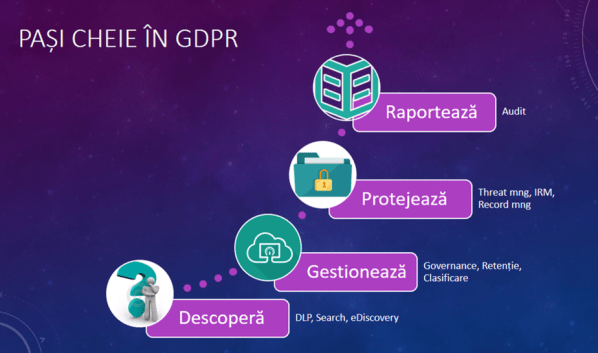
Specialiștii de la Microsoft identifică patru mari etape în eficientizarea proceselor de management al informațiilor în contextul GDPR: Descoperă, Gestionează, Protejează și Raportează.
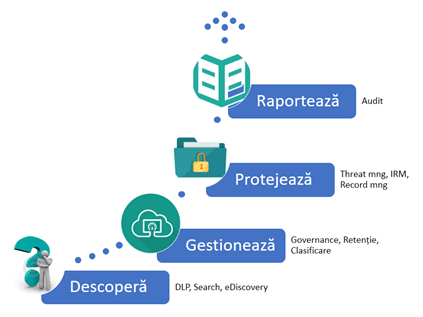
Figura 1 – Cei 4 pași ai GDPR
Pentru fiecare etapă dispunem de instrumente dedicare operațiunilor respective.
Aplicațiile de căutare (Search) pun la dispoziția responsabililor cu securitatea informațiilor seturi extinse de căutare a documentelor pe bază de cuvinte cheie, expresii sau expresii regulate (regex). Componentele de eDiscovery oferă posibilitatea de a deschide cazuri de analiză a conținutului informațional din SharePoint sau din Exchange-ul on-line cu posibilitatea de blocare a documentelor care răspund criteriilor de căutare, în așa fel încât să poată fi analizate fără a exista posibilitatea modificării lor pe tot parcursul derulării acelui caz. De asemenea, Office 365 oferă instrumente destul de puternice de limitare a pierderii sau scurgerii informațiilor (DLP – Data Loss Prevention) care acționează pe bază de reguli definite în centrul de Security & Compliance. Pentru versiunile on-premises componentele de DLP trebuie asigurate prin alte mecanisme, mare parte din funcționalități regăsindu-se în ambele metode de implementare a soluției de document management bazată pe tehnologiile SharePoint.
Politicile de retenție sunt prezente în SharePoint încă din primele versiuni ale acestuia, dar sunt foarte puțin utilizate de către companii. Nu de puține ori am fost pus în postura de a migra SharePoint-uri on-premises de la o versiune la alta. De tot atât de multe ori am fost nevoit să „car” dintr-o parte în alta sute de Gb de documente vechi, și prin vechi însemnând care nu au mai fost accesate, vizualizate de cel puțin doi ani. Aceste documente vechi și care nu mai sunt necesare generează costuri cu: serviciile de indexare, serviciile de inventariere a permisiunilor și audit, serviciile de stocare în baze de date, serviciile de stocare în copiile de siguranță, serviciile de scanare antivirus… și nu în ultimul rând cu serviciile de migrare. Retenția documentelor, definită corect, nu presupune ștergerea documentului de la prima iterație (momentul în care s-a împlinit condiția de arhivare), ci pot include mai multe etape (staging) de eliminare (safe) a documentului: arhivarea într-o arhivă electronică de cloud, mutarea într-o arhivă electronică din on-premises, ștergerea finală a documentului.
Clasificarea informațiilor și documentelor pare a fi una din cele mai anevoioase și cronofage operațiuni din GDPR și nu numai. Definirea taxonomiilor, tipurilor de documente și apoi aplicarea etichetelor descurajează orice inițiativă de acest gen dacă nu este proiectată și dimensionată corect ca efort. Una din cele mai spectaculoase operațiuni din Office 365 în raport cu GDRP este aceea de auto-etichetare a documentelor pe bază de etichete (labels) predefinite în centrul de Security & Compliance. La ora actuală sunt implementate 80 de tipuri de informații sensibile care permit autoetichetarea dintre care nici una pentru informații specifice documentelor oficiale din România: Serie și număr buletin sau CNP.
Microsoft pune în schimb la dispoziția specialiștilor o procedură de definire a acestor informații sensibile (https://goo.gl/1H1rG3) și de import a lor în centrul de DLP pentru autoetichetare. Cheia este definirea corectă a unei expresii regulate (regex) care să poată fi utilizată de instrumentele de căutare pentru identificarea similitudinii de informații. Această tehnică este foarte bine cunoscută de majoritatea programatorilor de aplicații clasice sau web. De exemplu: pentru a căuta un șir de caractere de forma unui buletin cu variantele: MX123456 sau MX 123456 sau MX-123456 expresia pe care trebuie să o utilizăm este: ^[A-Z]{2}[^a-zA-Z]?[0-9]{6}. Pentru un CNP, exemplu de validare pe lungime și primul caracter din CNP, expresia ar putea fi: ^[1|2|5|6][0-9]{12}, care semnifică faptul că șirul trebuie să înceapă neapărat cu 1, 2, 5 sau 6, urmat de 12 caractere de la 0 la 9. Pentru o validare exactă a CNP-ului, expresia regulată ar putea fi mult prea complexă.
Protecția documentelor în Cloud se asigură la fel ca în on-premises: aplicații antivirus și sisteme complexe de gestiune a drepturilor digitale (Information Rights Management) care presupun că un document poate fi accesat, doar în modul în care a fost solicitat, doar de persoana desemnată și doar în locația desemnată. Aceste mecanisme superioare de protecție sunt destinate de obicei documentelor cu un grad ridicat de confidențialitate iar uneori sunt foarte dificil de configurat. În Office 365 configurarea acestor servicii de IRM este mult mai simplă prin modul integrat de certificare digitală și verificarea identității utilizatorului și echipamentului de pe care se accesează un document.
Componenta de raportare este probabil cea mai dorită de managementul companiilor, pentru că oferă o privire de ansamblu cu privire la manipularea conținutului informațional din întreaga organizație. Funcțiile de audit pot fi configurate atât la nivel centralizat cât și la nivelul fiecărei biblioteci de documente din SharePoint.
Enumerarea celor mai importante funcționalități pentru managementul bibliotecilor de documente din Office 365 și SharePoint: Nume listă, descriere și navigare; Setări versiune; Setări complexe; Setări validare; Setări navigare metadate; Setări vizualizare pentru locație; Permisiuni pentru această bibliotecă de documente; Information Rights Management; Setări flux de lucru; Aplicați eticheta la elementele din această listă sau bibliotecă; Setări cuvinte cheie și metadate întreprindere; Generare raport plan fișiere; Setări politică de gestionare a informațiilor; Setări declarație înregistrare.
Fiecare din aceste funcționalități ne pot ajuta în îndeplinirea dezideratelor GDRP, dar înainte de toate ne sunt utile în derularea proceselor de afaceri din cadrul companiilor.
Office 365 ca și oricare altă soluție de document management, nu constituie un panaceu al GDPR. Este doar un instrument care poate ajuta companiile să își deruleze procesele de afaceri într-un mod transparent, securizat, flexibil și conform cu reglementările legale în vigoare.
Referințe:
- Microsoft Benchmark Tool – https://www.gdprbenchmark.com/
- Microsoft Trust Center – https://www.microsoft.com/en-us/TrustCenter/Privacy/gdpr/default.aspx
- Adrian B. Munteanu Blog – https://adimunteanu.wordpress.com/
- Accelerate your General Data Protection Regulation (GDPR) Compliance Journey – https://info.microsoft.com/ww-landing-M365EGDPR-accelerate-your-GDPR-compliance-whitepaper.html
- Data Classification Toolkit – https://msdn.microsoft.com/en-us/library/hh204743.aspx