
Many years ago, I wrote an article about a custom function in VBA to sum multiple cells based on the font color. In this article, I propose an improved version of this function that allows the user to perform counting or summation based on the font color or background color.
This function works for the scenario where the cells or font are applied manually, not through conditional formatting. Explanations are provided at the end of the article.
To use this function, copy the function text from the article, open Excel, and then open the macro window by pressing the Alt+F11 key combination. Insert a new module and then paste the text from the clipboard.
Usage example:
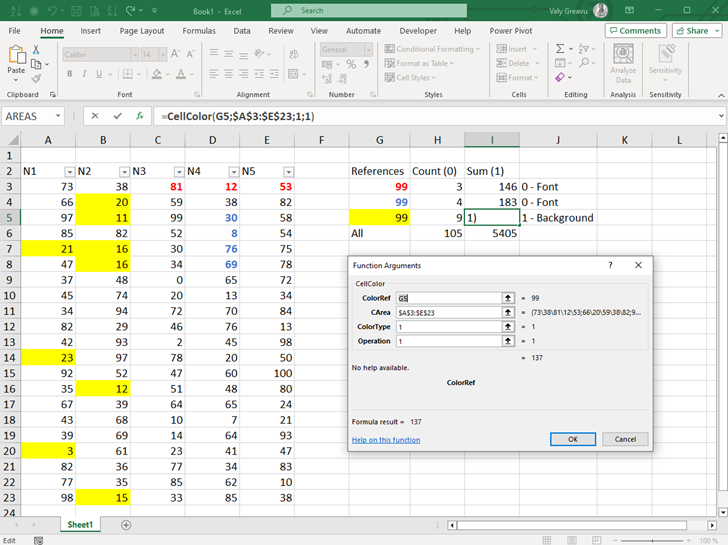
VBA Function CellColor
Function CellColor(ColorRef As Range, cArea As Range, ColorType As Integer, Operation As Integer) As Integer
'CellColor function is designated to perform specific operations on range of cell by font or background color
    ' Parameters:
        ' ColorRef - Reference cell that containing specific format
        ' cArea - Area to be analyzed
        ' ColorType: 0 - Font; 1 - Background
        ' Operation: 0 - Count; 1 - Sum

'Defining variables
Dim rrcArea As Range
Dim rrRange As Range
nCells = 0
Set rrcArea = cArea


Select Case ColorType
    Case 0 ' Font
            vColor = ColorRef.Font.Color
            Select Case Operation
                Case 0 ' Count
                    For Each rrRange In rrcArea
                        If rrRange.Font.Color = vColor Then
                             nCells = nCells + 1
                        End If
                    Next rrRange
                Case 1 ' Sum
                    For Each rrRange In rrcArea
                        If rrRange.Font.Color = vColor Then
                             nCells = nCells + rrRange.Cells.Value
                        End If
                    Next rrRange
            End Select
    Case 1 ' Background
            vColor = ColorRef.Interior.Color
            Select Case Operation
                Case 0 ' Count
                    For Each rrRange In rrcArea
                        If rrRange.Interior.Color = vColor Then
                             nCells = nCells + 1
                        End If
                    Next rrRange
                Case 1 ' Sum
                    For Each rrRange In rrcArea
                        If rrRange.Interior.Color = vColor Then
                             nCells = nCells + rrRange.Cells.Value
                        End If
                    Next rrRange
            End Select
End Select

' Return results
CellColor = nCells

End Function
If you want to use this function for conditional formatted cells, you must save and call macro as UDF format.
Details about colors in conditional formatting form here: https://stackoverflow.com/questions/45122782/how-to-get-the-background-color-from-a-conditional-formatting-in-excel-using-vba and how to use it as UDF here: https://www.ablebits.com/office-addins-blog/store-custom-functions-excel/
Alternate way of counting or sum values from conditional formatting cells are Countif() and Sumif() on the same condition as format.
I hope it will be helpful to someone!
 Valy Greavu - Live Blog