Pentru cititorii mei care sunt fani Excel, am reușit să găsesc o problemă foarte faină pe care o supun rezolvării publice. Am numit problema Transpose Like pentru că seamănă puțin cu operațiunea de Paste cu Transpose dar nu este același lucru. Sunt sigur că modelul acesta poate fi aplicat și în alte cazuri particulare decât cel al pontajelor.
Cerințele problemei
Se dă o echipă formată dintr-un anumit număr de persoane. Fiecare completează un formular de pontaj zilnic într-o aplicație paralelă. De asemenea, pot apărea situații speciale și altcineva (șeful de echipă sau un responsabil de pontaj) notează zilnic cazurile speciale. Sursa de date din aplicația paralelă este exportată la final de lună în format tabelar normalizat: Data, MarcaAngajat, NumePrenume, Ziua, nr ore lucrate, Alte situații. Fișierul de completat poate fi descărcat de la adresa: https://1drv.ms/x/s!ApGubfWFh8Nuq54Eb2x80NDXk66y7w
Raportul este în formatul fișei colective de prezență (figura 1): MarcaAngajat, NumePrenume, și zilele 1,2,3…30/31.
Raportul trebuie să preia datele din sursa de date și să afișeze în dreptul fiecărui angajat numărul de ore lucrate sau situațiile speciale.

Constrângeri
Problema trebuie rezolvată fără folosirea macro-urilor. Aș fi curios totuși dacă cineva oferă la o soluție cu Macro, sau de ce nu una în SQL  .
.
Indicații
Sunt permise adăugări de coloane ajutătoare în Sursa de date. Nu sunt permise adăugarea de noi coloane în Foaia colectivă. Zilele de weekend pot fi completate cu valoarea 0.
Transmiterea soluțiilor
Aștept cu interes rezolvarea voastră până mâine (10.01.2017) ora 11:59 pe adresa de e-mail valy.greavu@outlook.com cu subiectul Problema Transpose Like.
Premii
Pentru studenții care rezolvă corect problema, ofer recomandarea mea pentru angajarea pentru orice post care implică cunoștințe peste medie de Excel.
Pentru ceilalți: Respect!
[UPDATE 10.01.2017]
Mulțumesc tuturor prietenilor care au reușit să citească articolul și să încerce să rezolve problema. Am primit în total 8 soluții diferite. Le voi descrie pe rând, în ordinea sosirii fără a încerca să realizez un top. Toate soluțiile primite sunt funcționale. Urmează să execut o serie de teste de performanță pentru a stabili soluția optimă.
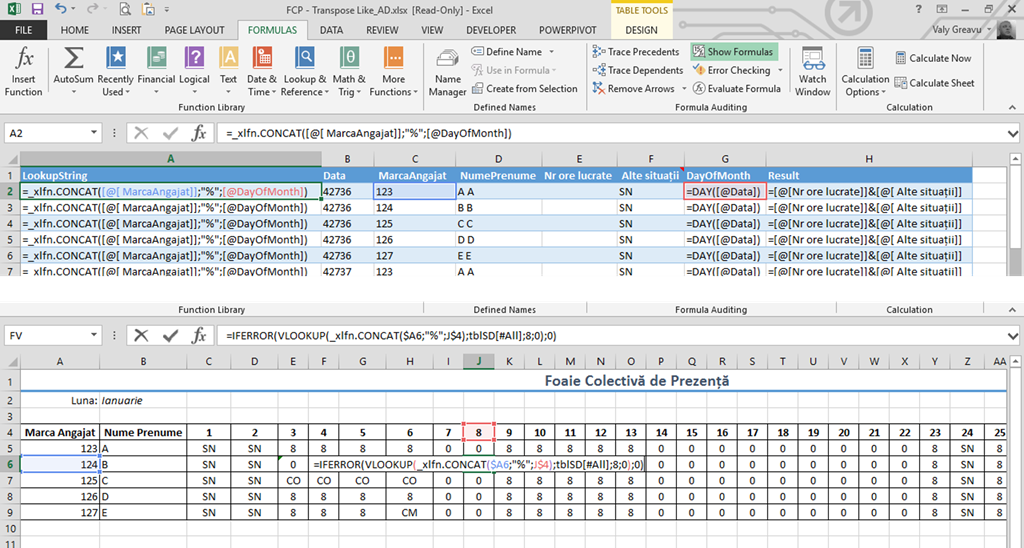
Prima soluție a venit de la Alexandru D, care a folosit 3 coloane ajutătoare în sursa de date pentru a determina unicitatea unei înregistrări, după care a folosit un vlookup pentru a aduce datele în formatul de raport cerut (vezi imagine).
A doua soluție a venit de la Florin E. El a folosit două coloane suplimentare în sursa de date, chiar dacă ar fi putut folosi doar una, dacă analizăm cu atenție formula din coloana Zi+Marca.

Soluția lui Florin folosește formula NetworkDays, dar asta presupune alterarea capului de tabel din Foaia colectivă de prezență. Uneori soluția de alterare a structurii tabelului nu este acceptabilă.
A treia soluție a venit de la Ciprian Stoian, un bun prieten, care a mai oferit soluții deosebite la problemele pe care le-am lansat pe aici. Ca să fac o glumă, Ciprian este cel care a dus la extremă conceptul de ERP în formatul Excel Resource Planning (concept ironic preluat de la un prieten de pe FB). Ciprian folosește o singură coloană ajutătoare și o formulă Index cu Sumproduct, fiind din punctul meu de vedere una din cele mai abstracte soluții primite.

Dacă doriți să o testați, formula pentru celula C5 este: =INDEX(tblSD[Pontaj];SUMPRODUCT(–(tblSD[[ MarcaAngajat]]=FCP!$A5);–(DAY(tblSD[Data])=FCP!C$4);ROW(tblSD[Data])-ROW(tblSD[[#Headers];[Data]])))
Un alt fan Excel semnat Tudor H, a trimis una din soluțiile cele mai apropiate de ceea ce îmi propusesem să vă prezint eu. Tudor folosește o formulă Array cu Index și Match condițional în formatul (conditie1)*(conditie2).
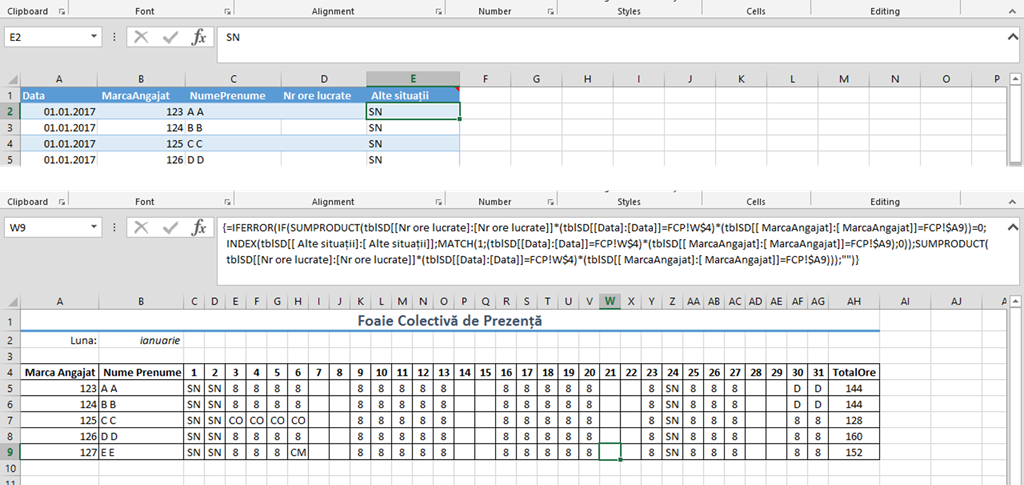
Pentru cei care doresc să testeze formula, pentru celula C5 aceasta este:
=IFERROR(IF(SUMPRODUCT(tblSD[[Nr ore lucrate]:[Nr ore lucrate]]*(tblSD[[Data]:[Data]]=FCP!C$4)*(tblSD[[ MarcaAngajat]:[ MarcaAngajat]]=FCP!$A5))=0;INDEX(tblSD[[ Alte situații]:[ Alte situații]];MATCH(1;(tblSD[[Data]:[Data]]=FCP!C$4)*(tblSD[[ MarcaAngajat]:[ MarcaAngajat]]=FCP!$A5);0));SUMPRODUCT(tblSD[[Nr ore lucrate]:[Nr ore lucrate]]*(tblSD[[Data]:[Data]]=FCP!C$4)*(tblSD[[ MarcaAngajat]:[ MarcaAngajat]]=FCP!$A5)));””)
Pentru cei mai puțin experimentați, introducerea formulei nu se realizează cu Enter ci cu Ctrl+Shift+Enter (modul de introducere formule array)
IPP, moderator pe comunitatea ITLearning.ro a transmis o soluție cu două coloane ajutătoare și un VLOOKUP. Simplu și util.

Explicații despre modul în care a rezolvat IPP și cum a gândit soluția puteți găsi la adresa: http://www.itlearning.ro/forum/viewtopic.php?f=119&p=55527#p55527
Dan C a oferit o soluție, de asemenea, bazată pe Index Match cu două coloane ajutătoare:
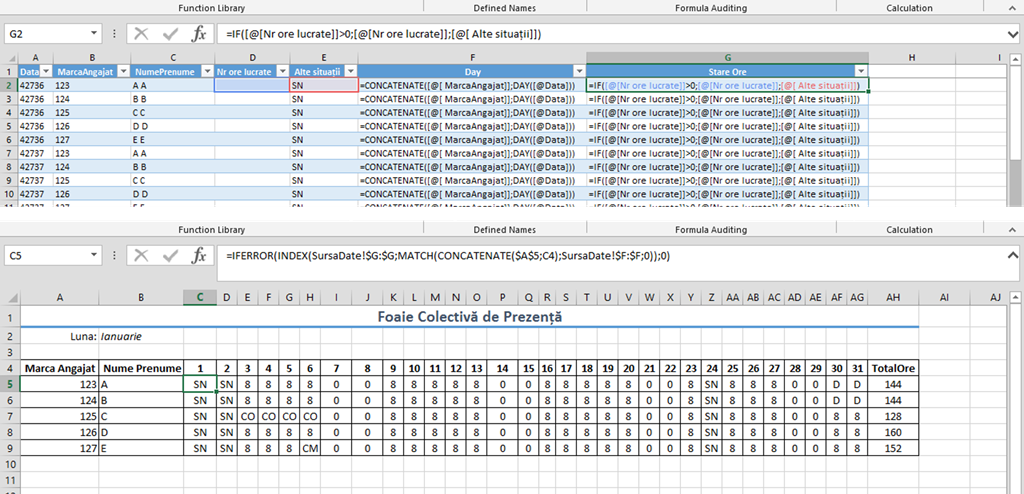
Posibilitatea de a putea introduce coloane ajutătoare simplifică mult problema pentru că Match-ul se face după o valoare compusă, nemaifiind necesare condiții multiple așa cum este specificat în soluția lui Tudor H.
A 7-a soluție a fost oferită de Ionut H care a folosit o coloană ajutătoare drept cheie de căutare pentru un Match din Index.
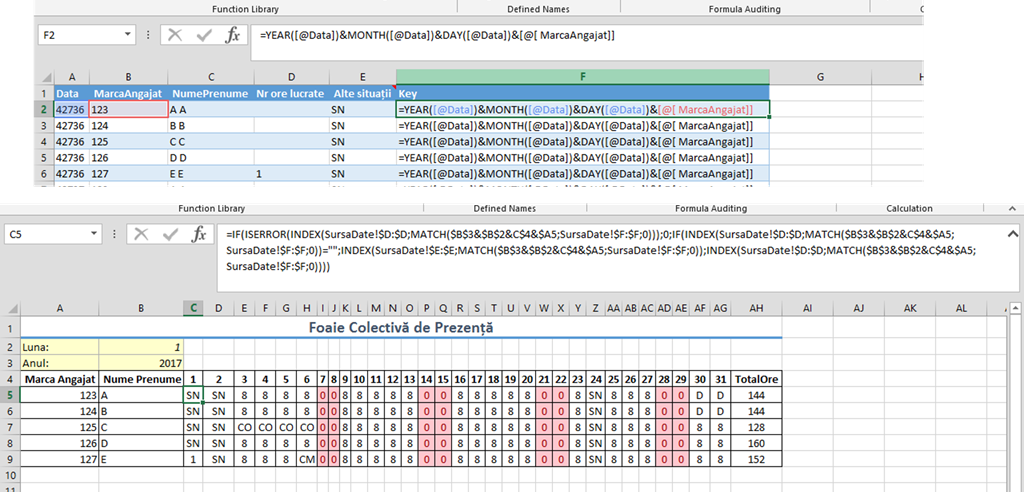
Pentru testare formula lui Ionut H pentru celula C5 este:
=IF(ISERROR(INDEX(SursaDate!$D:$D;MATCH($B$3&$B$2&C$4&$A5;SursaDate!$F:$F;0)));0;IF(INDEX(SursaDate!$D:$D;MATCH($B$3&$B$2&C$4&$A5;SursaDate!$F:$F;0))=””;INDEX(SursaDate!$E:$E;MATCH($B$3&$B$2&C$4&$A5;SursaDate!$F:$F;0));INDEX(SursaDate!$D:$D;MATCH($B$3&$B$2&C$4&$A5;SursaDate!$F:$F;0))))
Atenție, raportul lui Ionut este modificat fiind inclus anul în formulă și luna în format 1, 2, 3…12. În felul acesta soluția lui Ionuț este aplicabilă pentru surse de date care se ”întind” pe mai multe luni calendaristice.
Aproape de închiderea ediției am primit și cea mai lungă formulă ca soluție la această problemă. Ea vine de la colegul meu Florin M. și este oarecum elaborată pentru a calcula în mod diferit starea de la alte situații.
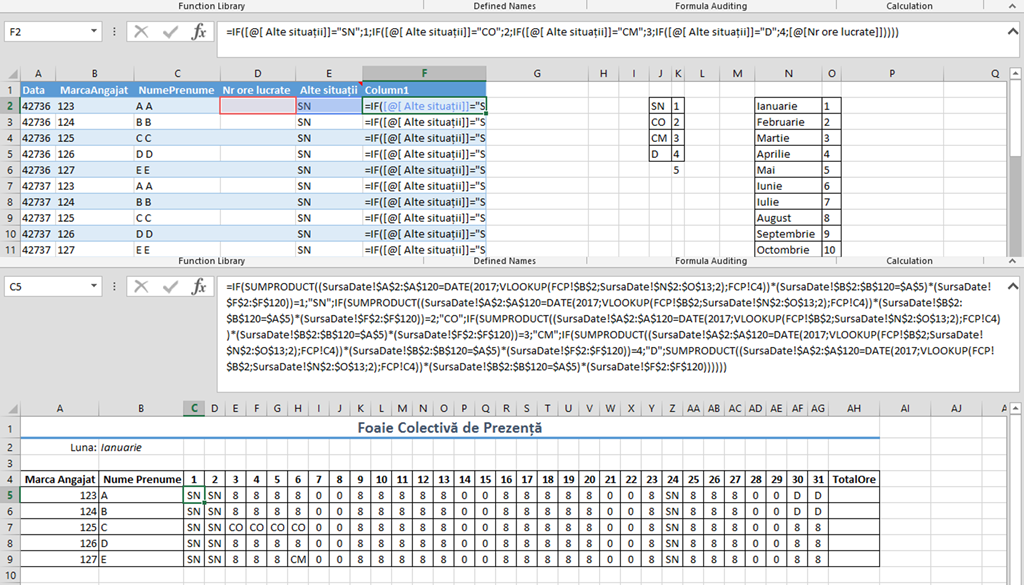
În sursa de date Florin folosește un IF pentru coloana ajutătoare, dar are alte două tabele de validare. Asta complică puțin problema. În partea de formulă folosește o combinație între IF, SUMPRODUCT și VLOOKUP.
La toate soluțiile rezultate sunt corecte. Mulțumesc tuturor pentru participare și dacă mai aveți probleme provocatoare, nu ezitați să mă contactați!
[L UPDATE]
Cineva a sesizat că nu am pus soluția mea. Personal am mers din start pe idea de a nu folosi coloane ajutătoare, dar este importantă ziua din data pontajului. Așa că am folosit funcția DAY pentru coloana data din tabelul sursă de date. De asemenea, am folosit o altă formă de Match condițional (cu ampersant) pentru a putea include marca angajat și ziua. Da, formula mea este un pic mai complicată și se execută mai greu. Este o formulă array.
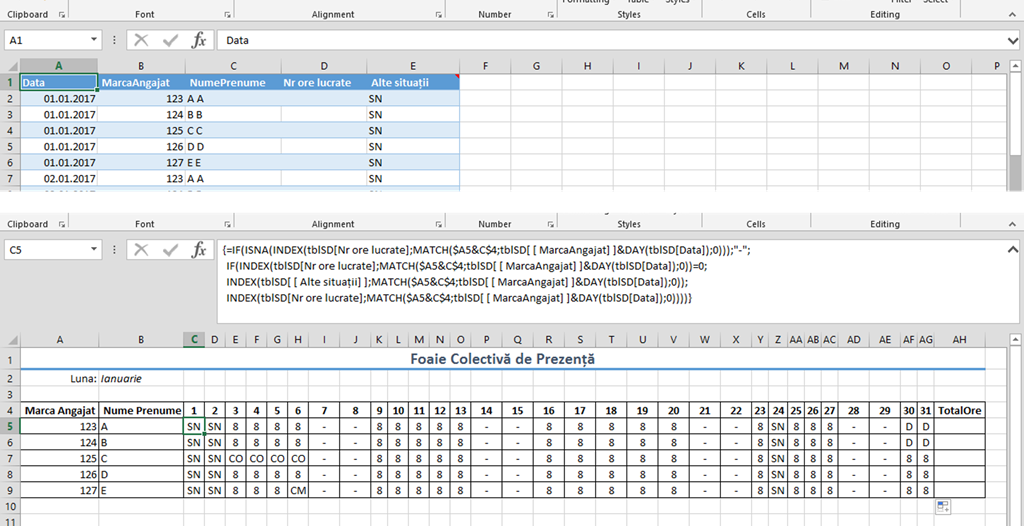
Pentru a testa formula, valoarea acesteia pentru celula C5 este:
=IF(ISNA(INDEX(tblSD[Nr ore lucrate];MATCH($A5&C$4;tblSD[ [ MarcaAngajat] ]&DAY(tblSD[Data]);0)));”-„;
IF(INDEX(tblSD[Nr ore lucrate];MATCH($A5&C$4;tblSD[ [ MarcaAngajat] ]&DAY(tblSD[Data]);0))=0;
INDEX(tblSD[ [ Alte situații] ];MATCH($A5&C$4;tblSD[ [ MarcaAngajat] ]&DAY(tblSD[Data]);0));
INDEX(tblSD[Nr ore lucrate];MATCH($A5&C$4;tblSD[ [ MarcaAngajat] ]&DAY(tblSD[Data]);0))))
Atenție, este o formulă array deci trebuie introdusă cu Ctrl+Shift+Enter.
In data de 11.01.2017 s-a mai primit o solutie de la Adrian B care a oferit două formule de calcul plus o soluție în VBA. În prima soluție Adrian folosește o formulă array cu Index, Match si Indirect iar in a doua soluție folosește o formulă clasică cu IF, CountIF, Indirect și Sumproduct.
=IF(COUNTIFS(INDIRECT(„tblSD[MarcaAngajat]”);$G11;INDIRECT(„tblSD[Data]”);DATE(2017;1;I$10))=0;0;IF(SUMPRODUCT((INDIRECT(„tblSD[MarcaAngajat]”)=$G11)*(INDIRECT(„tblSD[Data]”)=DATE(2017;1;I$10))*((INDIRECT(„tblSD[Nr ore lucrate]”))<>0))*8=0;”X”;SUMPRODUCT((INDIRECT(„tblSD[MarcaAngajat]”)=$G11)*(INDIRECT(„tblSD[Data]”)=DATE(2017;1;I$10))*((INDIRECT(„tblSD[Nr ore lucrate]”))<>0))*8))
Soluția VBA în schimb este oarecum diferită. Adrian a pus un buton în pagina cu sursa de date și a construit un Macro în spatele acesteia. Idea este că macro se execută mult mai repede pe cantități mai mari de date.
Codul sursă al Macro lui Adrian este:
Application.ScreenUpdating = False
st = Timer
With Sheets(sd)
lr = .Cells(Rows.Count, 1).End(xlUp).Row
For i = 2 To lr
isDay = CLng(Day(.Cells(i, 1)))
isEmp = .Cells(i, 2)
If .Cells(i, 4) = „” And .Cells(i, 5) = „” Then
erH = MsgBox(„Nr. Ore = 0 / Alte Situatii = Null” & vbNewLine & „Please check line ” & i & vbNewLine & „Do you want to abort?”, vbYesNo, „Eroare!”)
If erH = vbYes Then
Set erH = Nothing
Exit Sub
Else
GoTo erHyes
End If
ElseIf .Cells(i, 4) = „” Then
With Sheets(fcp)
Set dayFnd = .Range(.Cells(fcpHotRow, 3), .Cells(fcpHotRow, .Cells(fcpHotRow, Columns.Count).End(xlToLeft).Column)).Find(isDay, lookat:=xlWhole, LookIn:=xlValues)
Set empFnd = .Columns(1).Find(isEmp, lookat:=xlWhole, LookIn:=xlValues)
End With
fcpCol = dayFnd.Column
fcpRow = empFnd.Row
Sheets(fcp).Cells(fcpRow, fcpCol) = .Cells(i, 5)
Else
With Sheets(fcp)
Set dayFnd = .Range(.Cells(fcpHotRow, 3), .Cells(fcpHotRow, .Cells(fcpHotRow, Columns.Count).End(xlToLeft).Column)).Find(isDay, lookat:=xlWhole, LookIn:=xlValues)
Set empFnd = .Columns(1).Find(isEmp, lookat:=xlWhole, LookIn:=xlValues)
End With
fcpCol = dayFnd.Column
fcpRow = empFnd.Row
Sheets(fcp).Cells(fcpRow, fcpCol) = .Cells(i, 4)
End If
erHyes:
Set erH = Nothing
Set dayFnd = Nothing
Set empFnd = Nothing
Next i
End With
With Sheets(fcp)
totCol = .Cells(fcpHotRow, Columns.Count).End(xlToLeft).Column
lastFCProw = .Cells(Rows.Count, 1).End(xlUp).Row
For k = fcpHotRow + 1 To lastFCProw
.Cells(k, totCol) = WorksheetFunction.Sum(.Range(.Cells(k, 3), .Cells(k, totCol – 1)))
Next k
.Select
End With
tmr = Round(Timer – st, 2)
MsgBox „Succesfully ran in ” & tmr & ” seconds.”
Application.ScreenUpdating = True
End Sub
Un articol util care explică pas cu pas cum se realizează un Index cu Match cu criterii multiple este: INDEX MATCH with multiple criteria sau How to Use INDEX+MATCH With Multiple Criteria in 5 Easy Steps.
Sper să vă fie util!